
A domain, DNS, and the process on the port
The app answered on localhost. The domain I had just bought still showed a parking page. The name, the address, and the port are three different maps.
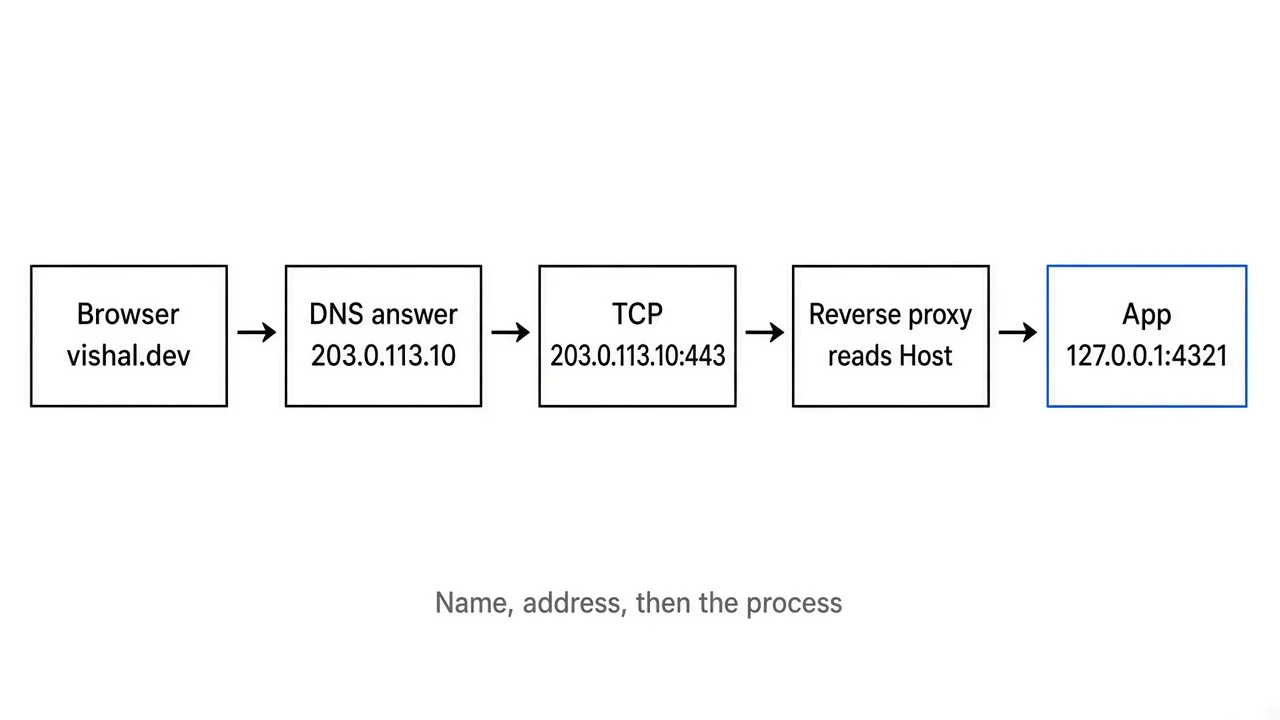
I bought a domain and spent the rest of the day convinced the server was down. The app was fine. http://127.0.0.1:4321 showed the home page. The name I had paid for showed a parking page I did not write.
Refreshing did not change that. Restarting the dev server did not change that. The name was never asking my laptop anything.
A domain, a DNS answer, an IP address, and a port are four different facts. A browser needs all of them before your process sees a request. This is the path I had to learn, and a reference for the week it breaks in a new shape.
The wrong layer
The parking page was a success, from the network's point of view. Something on the internet answered. DNS had a record. A server accepted a connection. That server belonged to the registrar, or to the host's default site, because the name still pointed at their address. My process on port 4321 was never in that path.
A blank error is a different failure. If the browser says it cannot find the server, the name may not resolve, or nothing is accepting connections on the address you reached. If you still get the old site after you changed the record, a resolver is holding the previous answer. Those three look similar in a tab. They are not the same bug.
I had been treating the URL as one string. It is a stack.
https://vishal.dev/posts splits like this.
httpsis the scheme. It tells the browser to speak TLS, and to use port 443 when you leave the port off.vishal.devis a name. It is not an address. Something has to turn it into one.- The port is implied. You rarely type
:443. /postsis for the application, after a connection already exists.
http://127.0.0.1:4321 skips the name. You handed the browser an address and a port. That is why the dev server worked while the domain did not. I had proved that a process was listening. I had not proved that the public name pointed at it, or that anything on the public internet could open that port.
What a name is
A domain name is a lease on a string, recorded in a hierarchy other people operate.
The last label is the top-level domain, the TLD. In vishal.dev that label is dev. The label to its left, vishal, is what I registered. notes.vishal.dev is a name I can create myself, once I control the zone for vishal.dev. I do not go back to the registrar for every subdomain. I go back when I want to change which name servers are on record for the zone.
Two organisations sit in that sentence, and the dashboards mix them up.
The registry runs the TLD. It keeps the database of which name servers are delegated for each second-level name. Verisign runs .com. Google Registry runs .dev. You usually never log into the registry.
The registrar is the shop. You pay the registrar. The registrar tells the registry, through a protocol called EPP, to create or renew the name and to publish the name servers you chose.
WHOIS, and its replacement RDAP, is how you read that delegation from outside. What I look for in the output is the registrar and the name server hostnames. If those name servers are still the registrar's default, the registrar's DNS is the one answering. Records I edited at another DNS host do nothing until the registry lists those servers.
whois example.comOn a Mac that is the system whois. Scroll to Registrar: and Name Server:. For a .dev name, RDAP is the cleaner lookup. IANA lists the RDAP server for each TLD: https://www.iana.org/domains/root/db.
.dev has a trap that shows up as soon as you try plain HTTP. The whole TLD is on the HTTP Strict Transport Security preload list. Browsers will not stay on http:// for a .dev name. They upgrade to HTTPS, or they fail. A certificate is part of bringing the name up. http://localhost still works, because localhost is not that TLD. You can see the preload entry here: https://hstspreload.org/?domain=dev.
How a lookup walks
The laptop does not start at the root of DNS every time you type a name. A small library in the operating system, the stub resolver, asks a recursive resolver. That resolver is what the router got from the ISP, or what you set, such as 1.1.1.1 (Cloudflare) or 8.8.8.8 (Google Public DNS). The recursive resolver does the walking, then caches the answer.
When the cache is empty, the walk is a chain of referrals.
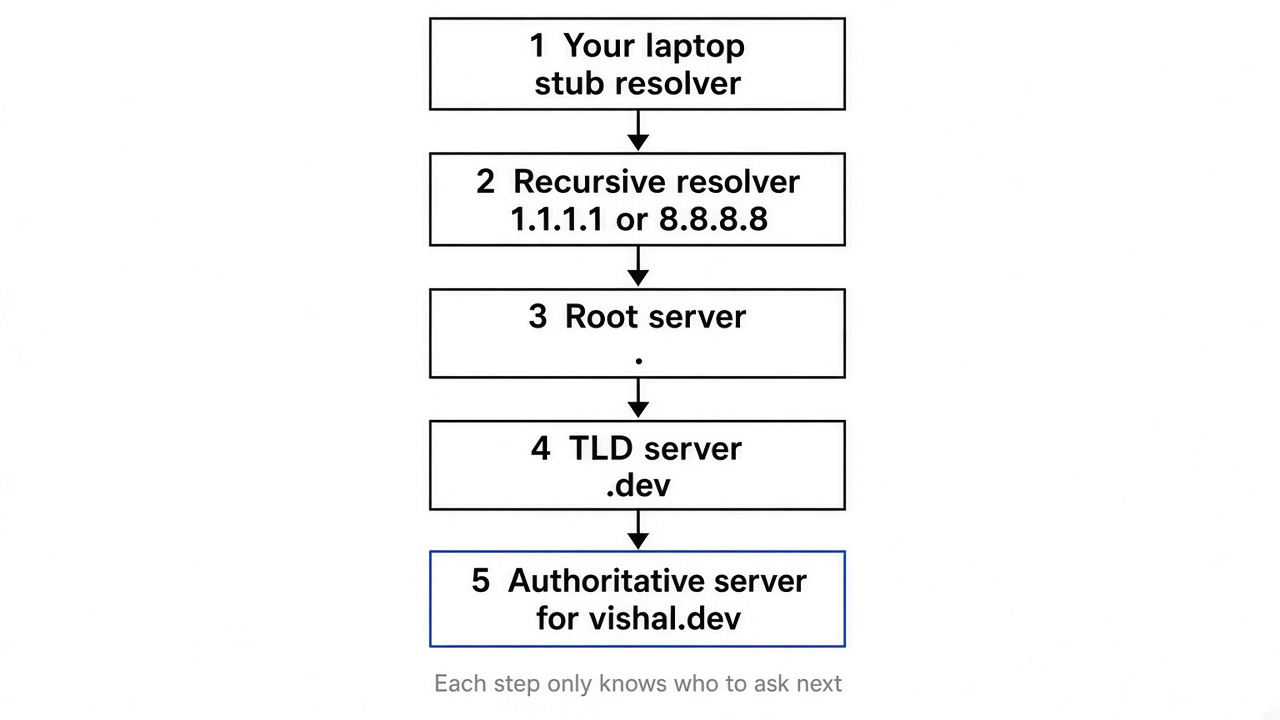
The addresses in that picture, and in the ones below, are from the documentation range in RFC 5737. 203.0.113.10 is not a server of mine. It is a number reserved so a diagram can show a network without pointing at someone else's machine.
The root servers know the name servers for .dev. The .dev servers know the name servers for vishal.dev. Those name servers, the authoritative ones, hold the records for the zone. Each earlier step returns a referral, not the final address.
That split is the design in RFC 1034. The base protocol is RFC 1035. Paul Mockapetris wrote the earlier specifications, RFC 882 and RFC 883, in 1983. Before that, hosts copied a file of names around. The file did not survive the size of the network.
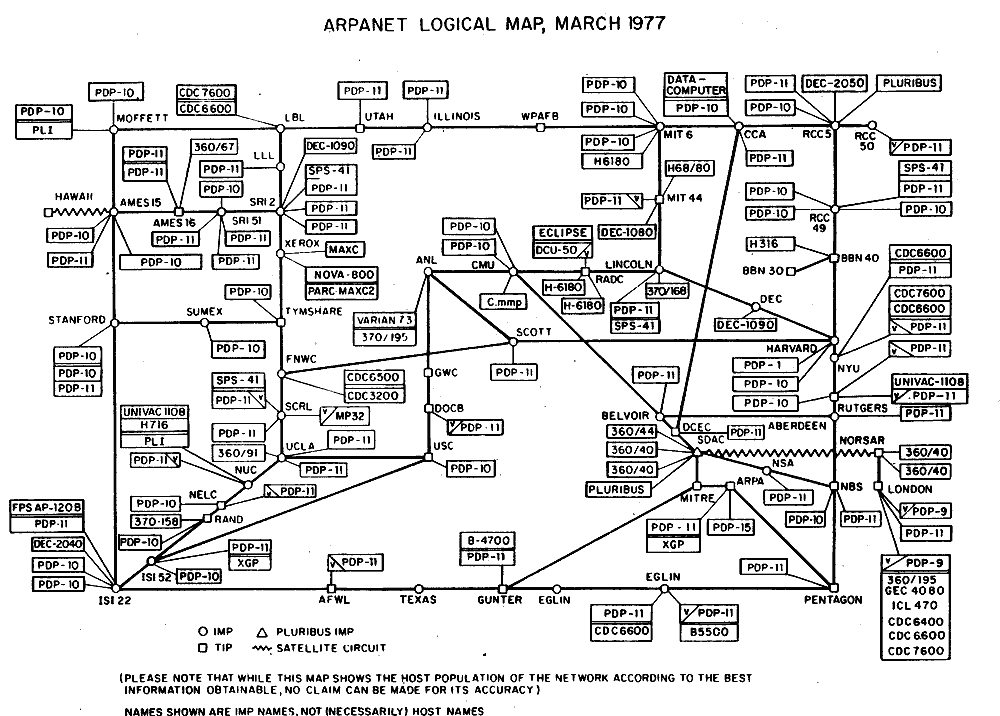
ARPANET logical map, March 1977. Public domain, via Wikimedia Commons. The note on the sheet says the labels are IMP names, not necessarily host names. Each box is still a machine you had to address. DNS is the later system that let a name outlive one machine.

dig +trace example.com prints a fresh walk. It is long. The shape is the part to keep: root, then the TLD, then the zone.
For a single answer:
dig example.com A +noall +answerWhen I ran that while writing this, the reply was:
example.com.		243	IN	A	104.20.23.154
example.com.		243	IN	A	172.66.147.243
Those addresses will change. The fields will not. Left to right:
example.com. is the name. The trailing dot means it is fully qualified. In a zone file, a name without that dot gets the zone origin appended. That is how people publish www.example.com.example.com without meaning to.
243 is the time to live, in seconds, as the resolver that answered me still had it. It is not a promise that the record was published with a TTL of 243. Caches count down. After you change an address, resolvers that already asked can keep the old one until their copy expires. Before a move, lower the TTL, wait out the old value, then change the record.
IN is the class, Internet. You will almost never see another class.
A is the type. An A record stores an IPv4 address.
Two lines mean the name has more than one A record. The resolver hands both over. The client picks one. That is normal when a host sits on more than one machine.
dig example.com NS +noall +answerThat prints the delegated name servers. The copy I got listed elliott.ns.cloudflare.com and hera.ns.cloudflare.com, with a TTL in hours, which is usual for NS records. You change name servers rarely, and you want the world to remember them.
To ask one recursive resolver and skip whatever the laptop is using:
dig @1.1.1.1 example.com A +noall +answer@8.8.8.8 does the same against Google Public DNS. If those two agree and the browser does not, the stale copy is closer to you: the browser, the operating system, or the router.
Status codes sit in the header, which +noall hides. Drop that flag once and look for status:.
NOERRORmeans the name exists. An empty answer withNOERRORmeans the name exists and has no record of the type you asked for.NXDOMAINmeans the name is not in the zone.SERVFAILmeans the resolver could not get a usable answer. A broken DNSSEC signature, a dead authoritative server, or a referral loop shows up here.
A few flags in that header are worth recognising. aa means an authoritative server sent the reply. ra means the server was willing to recurse. ad means the resolver marked the data as DNSSEC-authenticated.
The records that keep showing up
The zone is a set of records at names. These are the types that show up once a project has a real domain.
A and AAAA
A is IPv4. AAAA is IPv6. Publish both if the machine has both. Clients that implement Happy Eyeballs (RFC 8305) try the two families together, instead of waiting for one to fail.
dig example.com AAAA +noall +answerCNAME
A CNAME says this name is an alias of that name. The resolver then looks up the target. A CNAME is not allowed to sit next to other records at the same name. RFC 1034 says it is the only data at that name, apart from DNSSEC signatures added later. The apex of the zone, example.com itself, already has NS and SOA records, so a CNAME there is invalid.
Host docs often show a CNAME for www, and people paste the same record onto the bare domain. www can be a CNAME. The apex cannot. Some DNS companies sell a substitute called ALIAS, ANAME, or CNAME flattening. That is not a standard record type. The company answers the lookup with A or AAAA records it fetched on your behalf.
NS
NS records name the servers for the zone. The parent zone, the TLD, publishes a delegation, and the zone itself publishes the same servers. If those two lists drift, some resolvers follow the parent and some follow the child. Keep them the same.
SOA
Start of authority. One per zone. It carries the primary name server, a mailbox written with a dot instead of @, a serial number, and four timers: refresh, retry, expire, and the minimum TTL used for negative answers.
dig example.com SOA +noall +answerThe copy I got ended with dns.cloudflare.com. as the mailbox, which means dns@cloudflare.com. The first unescaped dot splits the local part from the domain. You bump the serial when the zone changes, if you are the one serving it. Hosted DNS usually bumps it for you.
MX
Mail exchange. It points at a hostname that receives email for the domain, plus a preference number. It does not point the website anywhere. Deleting the A record leaves the MX in place. Mail can keep working while the site does not.
TXT
A string. SPF lives here. So do DKIM records, the ownership checks from Search Console and certificate providers, and a lot of one-off tokens. A TXT record does not route traffic.
CAA
Certification Authority Authorization, RFC 8659. It lists which certificate authorities may issue for the name. Set it wrong and the CA you wanted will refuse you. Set nothing and any CA may issue, which is the default.
SRV
Service location. It can say that a particular service for this domain is on that host and that port. Browsers do not consult SRV records to find a website. Some chat and mail clients do.
PTR
The reverse map, from an address back to a name. It lives under in-addr.arpa for IPv4 and ip6.arpa for IPv6. The owner of the address block controls it, often the hosting company rather than you. Mail servers check it. Web browsers do not.
DNSSEC
The authoritative server can sign the records. A validating resolver sets the ad flag when the signatures check out, and returns SERVFAIL when they do not. The usual way to break a working domain is to turn DNSSEC on at the DNS host and forget the DS record at the registrar, or to change hosts and leave the old DS record in place. If a name fails everywhere and dig shows SERVFAIL, look at DNSSEC before you look at the web server.
Addresses that never leave the building
An IP address identifies a network interface, at the internet layer. It does not identify a program. Many programs share one address. The port, next, is what separates them.
IPv4 addresses are 32 bits, written as four decimal numbers. IPv6 addresses are 128 bits, written in hex with colons. example.com had both when I looked it up. A machine can have several addresses, one per interface: Wi-Fi, Ethernet, a tunnel, loopback.
Some addresses are routed on the public internet. Some are defined so they are not.
RFC 1918 reserved three IPv4 blocks for private networks:
10.0.0.0/8172.16.0.0/12, which runs from172.16.0.0through172.31.255.255, not the single network172.16.0.0/16192.168.0.0/16
A laptop at 192.168.1.20 is in the third block. The home router uses it. The rest of the internet does not route it. A site on that laptop stays invisible to anyone outside until some machine with a public address forwards traffic in.
127.0.0.0/8 is loopback. 127.0.0.1 is the usual IPv4 address for this machine. Packets to it never leave the box. IPv6 uses ::1.
0.0.0.0 is not another way to write localhost, even when a server log prints it and the app is only reachable locally. As a bind address, 0.0.0.0 means every IPv4 interface. The process accepts connections on localhost and on the LAN address. As a bind address, 127.0.0.1 means local connections only. An app can be "running" and still refuse a reverse proxy on another machine, because it bound to loopback. Binding to 0.0.0.0 makes it reachable. On a laptop, that also means the LAN can reach it.
100.64.0.0/10 is RFC 6598, the range carriers use for carrier-grade NAT. If the address your home router calls public sits in that block, you are already behind someone else's translator. A port-forward rule on your own router is not enough for a stranger to connect. A VPS, or a tunnel, is the usual way out.
RFC 6761 reserves a few names so they are not ordinary public lookups. localhost is one. .test, .example, .invalid, and .localhost are others. example.com is reserved for documentation by RFC 2606. Use those in samples.
There is also a file that beats DNS. On macOS and Linux it is /etc/hosts. On Windows it is C:\Windows\System32\drivers\etc\hosts.
127.0.0.1 example.testThat line resolves the name to loopback before any resolver is asked. I use it when I want the real hostname, with the cookies that go with it, against a server on the laptop. After an edit, macOS sometimes keeps the old answer.
sudo dscacheutil -flushcache
sudo killall -HUP mDNSResponder
The browser keeps a cache on top of the system. In Chrome, chrome://net-internals/#dns can clear it. If dig is right and the browser is wrong, you are looking at a cache, not at the zone.
Some browsers send DNS over HTTPS to a resolver they chose, and skip the operating system's resolver. A hosts-file entry can still apply, depending on the setting. If dig and the browser disagree and the hosts file is innocent, check whether secure DNS is on.
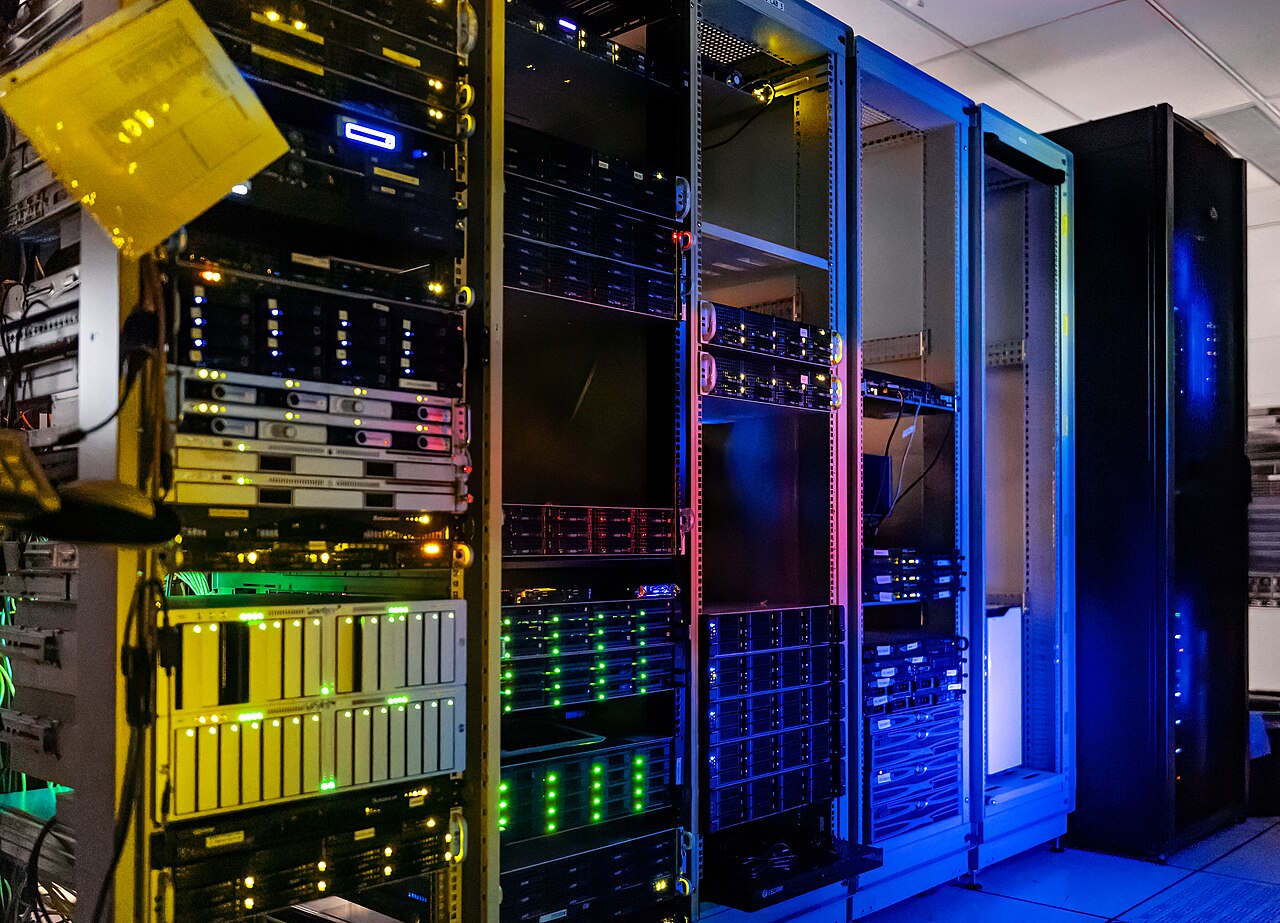
Server racks at NOIRLab headquarters. Photo by T. Slovinský, NOIRLab/NSF/AURA, CC BY 4.0, via Wikimedia Commons.jpg). A public address is attached to a machine in a room like this, or to a virtual machine on one. The name does not live in the rack. The name is a record that points at an address the machine will answer for.
The port is the other half
A connection is not "to an IP." It is to a socket: an address, a port, and a protocol, TCP or UDP.
DNS itself mostly uses UDP port 53, and falls back to TCP port 53 when the answer is too big. DNSSEC answers often are. The web uses TCP. HTTP defaults to 80. HTTPS defaults to 443. SSH is 22. Postgres listens on 5432 unless you move it. The dev servers I run use 3000, 4321, 5173, or 8080. Those numbers are convention. Nothing stops you from serving HTTPS on 8443. You will type the port in the URL, because the browser will not guess it.
Ports 0 through 1023 are the well-known range. On Linux and macOS, binding one of them takes root, or a capability granted to the program. That is one reason the app listens on 4321 and a proxy listens on 443.
The client uses a high port as its source. The server's destination port is 443. The client's source port might be 51820, and the reply comes back to it. IANA's suggested dynamic range is 49152 through 65535. Linux often uses 32768 through 60999 (ip_local_port_range). You rarely set this. You do see it in logs, and it is not the port your app chose.
To see what is listening on a Mac:
lsof -nP -iTCP:4321 -sTCP:LISTEN-nP stops lsof from turning numbers back into names. On Linux, ss -ltnp 'sport = :4321' is the same question. If the command prints nothing, nothing is listening. The rest of the stack cannot invent a process.
NAT is the rewrite that lets a private network share one public address. The router remembers that a packet from 192.168.1.20, source port 51820, should return to that machine. From outside, the connection looks like it came from the router's public address. RFC 3022 describes the translation.
Port forwarding is the same rewrite, set up on purpose, for a connection that starts outside. Public port 443 goes to 192.168.1.20 port 443.
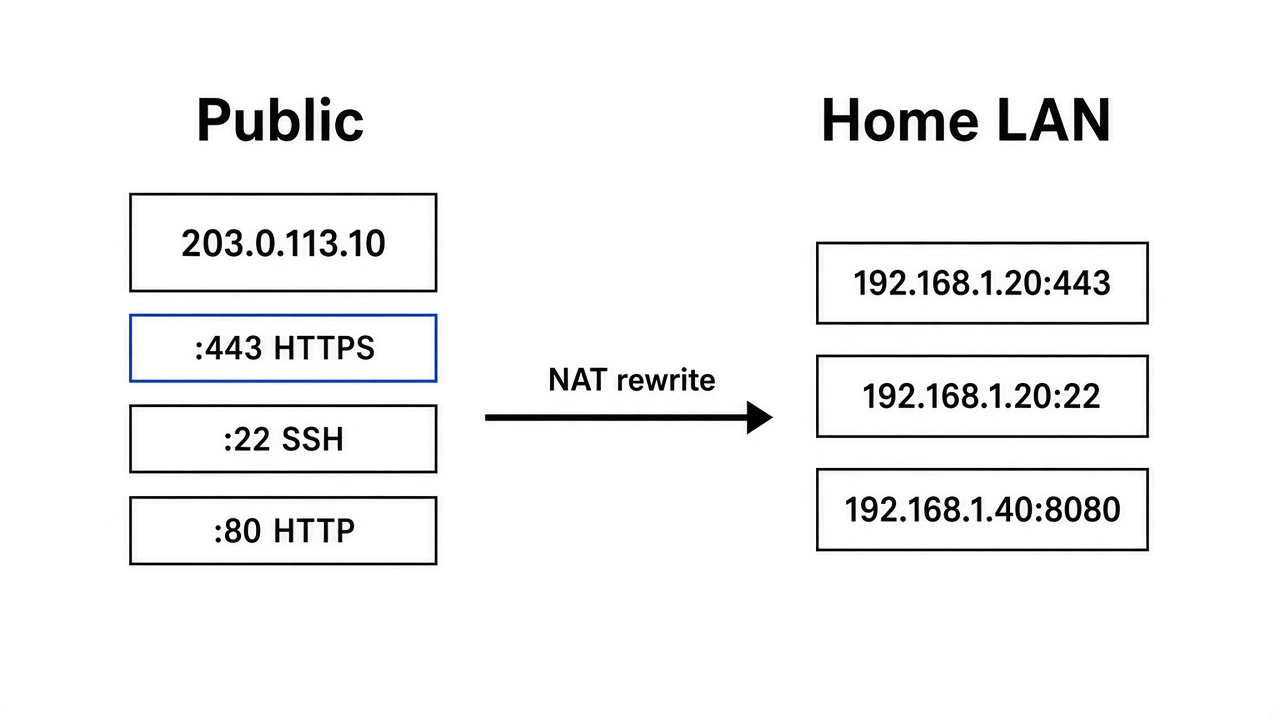
The arrow is one kind of rewrite, drawn once. Each public port is its own rule. In the picture, 443 and 22 are aimed at 192.168.1.20, and port 80 is sitting on the public side with nowhere to go yet. That is a normal half-finished router page. A public port with no rule, or a rule aimed at a machine that is asleep, times out. It does not look like a DNS error.
Docker does a small version of the same rewrite. This publishes container port 4321 on host port 8080:
docker run -p 8080:4321 my-appThe number on the left is the host. The number on the right is the container. From another container on the same Docker network, you use the container port and the container name. From a browser on the host, you use the published port. Curling 4321 on the host does nothing if only 8080 was published.
Inside the container, a process bound to 127.0.0.1 is loopback in that network namespace. Docker's publish rule will not reach it. Bind the app to 0.0.0.0 in the container, then publish the port.
One address, more than one site
Port 443 can have one listening process. I still want vishal.dev and notes.vishal.dev on the same machine. The proxy is that process. The apps listen on other ports, on loopback, where the public internet cannot open them directly.
TLS has an extension called Server Name Indication, SNI, from RFC 6066. The client sends the name during the handshake, before the certificate is chosen, because the certificate has to match the name. After the handshake, HTTP sends a Host header with the same name. RFC 9110 defines that header. The proxy uses one or both to pick an upstream.
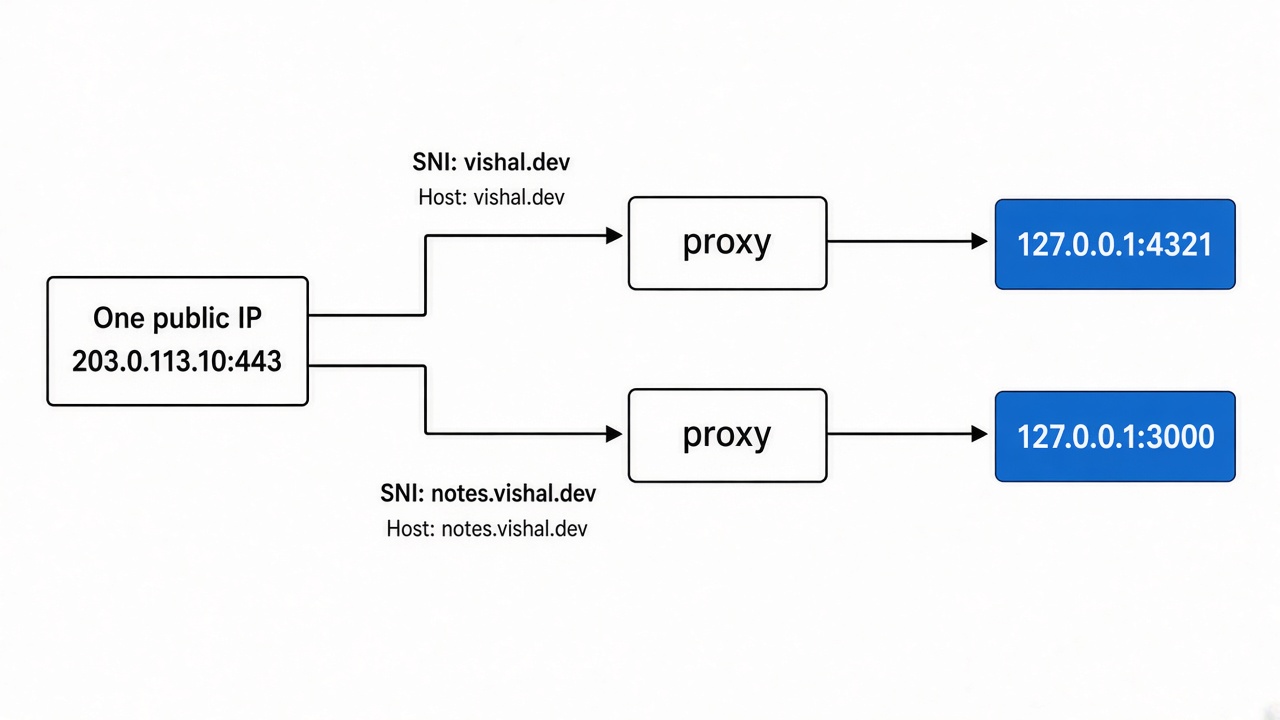
The proxy is drawn twice so each name has its own line. It is one process, with two server blocks.
A minimal nginx shape, with the certificate lines left out:
server {
  listen 443 ssl;
  server_name vishal.dev;

  location / {
    proxy_pass http://127.0.0.1:4321;
    proxy_set_header Host $host;
    proxy_set_header X-Forwarded-Proto https;
  }
}
proxy_set_header Host $host is the line I forget. Without it, nginx sends the upstream address as Host, and the app builds links and redirects for 127.0.0.1:4321. X-Forwarded-Proto tells the app the original request was HTTPS, so it does not emit http:// URLs behind the proxy.
Caddy will fetch a certificate and proxy with less configuration. The mapping is the same. A name arrives on 443. A process on another port receives plain HTTP on localhost.
If the app and the proxy share a machine, bind the app to 127.0.0.1 only. The public sockets belong to the proxy. Leaving 4321 open on the firewall lets anyone skip the proxy, the certificate, and whatever auth you put in front.
One request, in order
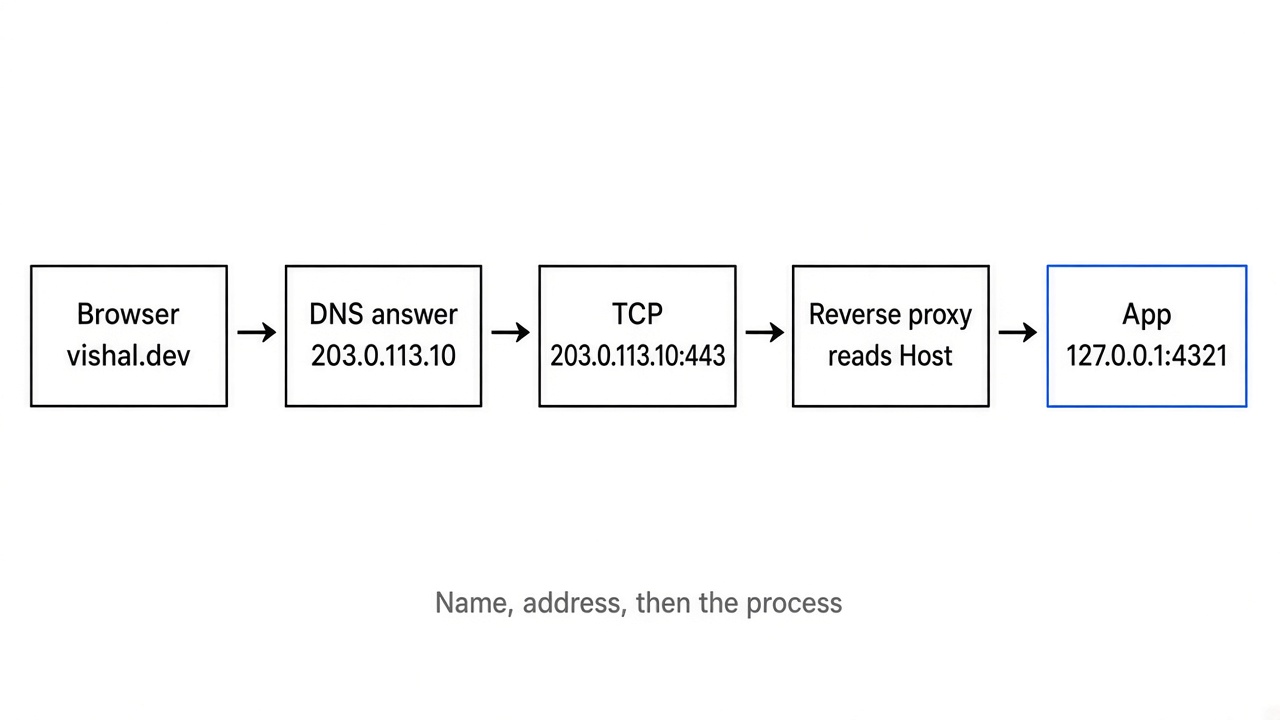
- The browser checks its own DNS cache, then asks the operating system.
- The stub resolver checks
/etc/hosts, then asks the recursive resolver, unless the browser is doing DNS over HTTPS on its own. - The resolver returns one address, or several. The browser picks. For a
.devname it uses HTTPS. - It opens TCP to that address on port 443. The handshake is SYN, SYN-ACK, ACK. You do not configure it. You feel it as "connection timed out" when nothing answers, and as "connection refused" when a machine is up and the port is closed.
- TLS runs. SNI carries the name. The server sends a certificate. The browser checks that the name is on the certificate and that a trusted authority signed it.
- HTTP goes over that connection. The Host header is the name you typed. The path is whatever came after it.
- The proxy, if there is one, opens its own connection to
127.0.0.1:4321and forwards the request. - The app reads the request and writes a response. The response walks back through the same sockets.
Cloudflare, or a host that deploys the app for you, sits in this path and hides steps. The name's A record often points at the platform, not at your process. The platform terminates TLS, then connects to an origin on a port you set, or runs the app on their network so there is no origin port for you to manage. The layers are still there. "Origin down" means step 7 failed. A certificate stuck in "pending" means step 5. A name that does not resolve never reaches step 4.
Refused and timed out are different sentences. Refused is a TCP reset: usually nothing is listening, or a firewall rejects quickly. Timed out means packets went unanswered. A firewall dropping them, a NAT rule aimed at a dead machine, or a missing route all look like that.
When it is still broken
Match the symptom, then the layer.
The registrar's parking page loads. DNS works, and it points at the wrong address. Change the A or AAAA record, or change the name servers if the records you edited live on a host the registry is not delegating to.
dig says NXDOMAIN. The name is missing from the zone that was asked, or the delegation is wrong. Compare the NS records at the registrar with the DNS host you think you are editing.
dig says SERVFAIL everywhere, including @1.1.1.1. Look at DNSSEC and at whether the name servers answer, before you look at nginx.
dig shows the new address and the browser shows the old site. TTL, the browser cache, or the operating system cache. dig @1.1.1.1 is what a public resolver has. Yours can lag it.
dig is right and curl -v https://example.com hangs or is refused. You are past DNS. Check that something listens on 443 on that machine, that the cloud firewall allows it, and that the process is not bound only to localhost.
The proxy returns 502. The proxy is up and the upstream is not. Wrong port in proxy_pass, the app bound to localhost while the proxy is on another machine, a container port that was never published, or the app has crashed.
The site loads, then redirects to http://127.0.0.1:4321. The app built a URL from the Host it saw. The proxy did not pass the original Host, or did not say the request was HTTPS.
Mail works and the website does not, or the other way around. MX and A are different records.
The short list
Domain name. A leased string. The TLD registry delegates a zone to name servers. You buy that through a registrar.
Zone. The records those servers hold for the domain, and for names under it that you have not delegated away.
Resolver. The stub on the laptop. The recursive resolver at the ISP, or at 1.1.1.1 or 8.8.8.8. Authoritative servers hold one zone and do not recurse for the rest of the world.
TTL. How many seconds a cache may keep an answer. Lower it before a move, then wait.
A and AAAA. An IPv4 address and an IPv6 address for a name.
CNAME. An alias. Invalid at the zone apex, which already has SOA and NS. ALIAS and CNAME flattening are products, not record types in the spec.
NS and SOA. Which servers hold the zone, and the zone's serial and timers.
MX, TXT, CAA, SRV, PTR. Mail routing, a free-form string, which certificate authorities may issue, where a service listens, and the reverse name for an address.
Socket. An address, a port, and TCP or UDP.
Bind address. 127.0.0.1 is this machine only. 0.0.0.0 is every IPv4 interface. ::1 is IPv6 loopback.
NAT and `-p`. A router or Docker rewrites one address:port onto another.
SNI and Host. The name, once in the TLS handshake and again in HTTP, so one listener on 443 can serve more than one site.
The specs I open are RFC 1034 and RFC 1035 for DNS, RFC 1918 for private addresses, and RFC 6066 for SNI. dig tells me whether I have a name yet. lsof tells me whether a process is actually on the port. I run them in that order. The parking page was a healthy process on the wrong map.